Tab 1: Aerosols
Start screen:
[caption id="attachment_2982" align="alignright" width="200"] This is the first screen of the iSPEX app[/caption]
This is the first screen you will see once you've opened the app. The message on the top of the screen says:
Aerosols, Place the iSPEX add-on. Turn on your sound. Stand with the sun in your back and push "Begin meting!"(start measurement).
The two buttons say:
This is the first screen of the iSPEX app[/caption]
This is the first screen you will see once you've opened the app. The message on the top of the screen says:
Aerosols, Place the iSPEX add-on. Turn on your sound. Stand with the sun in your back and push "Begin meting!"(start measurement).
The two buttons say:
- Start measurement!
- Watch instruction video
- Aerosols (the one you are in now)
- Map
- Spectrum
- Polarisation
- Info
[caption id="attachment_2982" align="alignright" width="200"]
 The next screen after you push "begin meting!"[/caption]
Step 1
If you push the button "begin meting!", you will see the following screen, which asks you to do the following: Step 1, Keep your iPhone vertical. Follow the arrow, until the button 'Ok, verder' appears. The button in the top-left corner (Annuleren) allows you to cancel the process. [caption id="attachment_2995" align="alignnone" width="150"] You've pointed in the right direction. Push "Ok, verder" to start the measurement.[/caption]
[caption id="attachment_2998" align="alignright" width="200"]
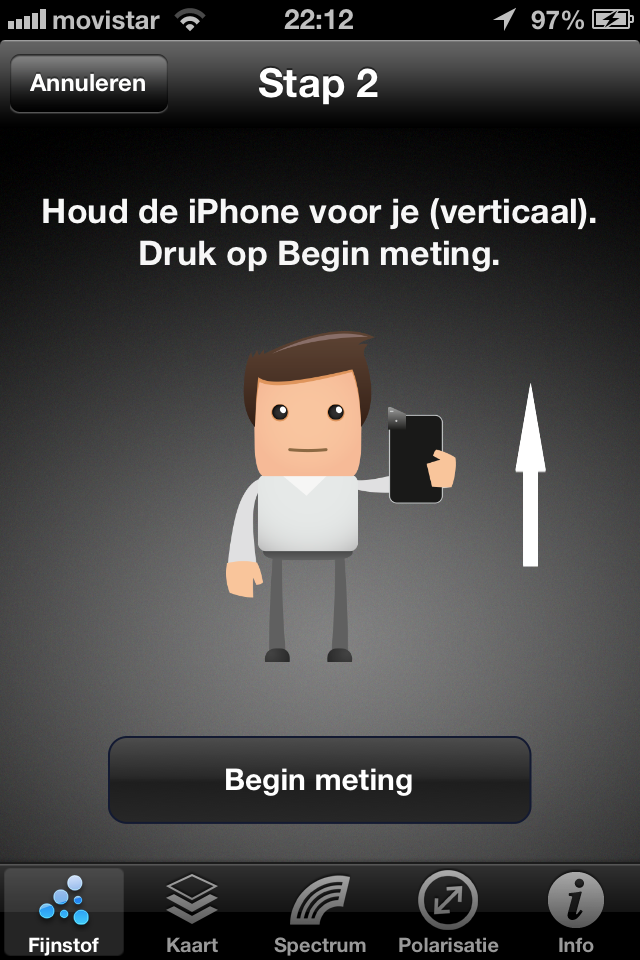 Push "Begin meting"[/caption]
Step 2
After you have pushed "Ok, verder" (Ok, continue), you'll see the following screen, with an arrow pointing up, unless you've not turned on your GPS (see below). The text says: Keep the iPhone in front of you (vertical). Push "Begin meting" (start measurement). If you haven't placed your iSPEX add on, or you are not outside pointing at the blue sky, the app will give an error message shown below. Let's assume that this is not the case. Then, you have just started your measurement![caption id="attachment_3006" align="alignleft" width="200"]
 You've just started your measurement! Move your iPhone up with a straight arm.[/caption]
Measuring
Although it still says step 2 in the header, youve just started measuring! This screen tels you: Keep your arm straight as you move (your iPhone) slowly to the point above your head. When you reach this highest point, the iPhone will be in a horizontal position. At this point, the app asks you to repeat this measurement (just to be sure).[caption id="attachment_3015" align="alignright" width="200"]
 Please repeat the measurement by pressing "Meet nog een keer"[/caption]
Repeat
To make sure that we are looking at the same patch of blue sky, we ask you to repeat the measurement: Push on the button to measure once more If the two measurements are too different from eachother, the app asks you to measure one more time. Most of the time, this is not necessary.[caption id="attachment_3018" align="alignleft" width="200"]
 You've finished your measurements. Press "Naar resultaat" to see the results[/caption]
Measurement complete
The two measurements are similar enough to be a good measurement. This means that you have completed this measurement. The app now tells you: Done! Press the button to continue If you press the button: "Naar resultaat" (To results), you will see a preliminary interpretation of your measurement.[caption id="attachment_3020" align="alignright" width="200"]
 Please submit the results by pressing "Verstuur"[/caption]
Results
This page of the app tells you the preliminary results (Voorlopig resultaat) of your measurement. For a definite interpretation, we ask you to submit (Verstuur) the measurements to iSPEX headquarters. The colored balloon indicates how clear the sky was during the measurement, which is also described by the text next to it, in this case "Heel helder" (very clear). Please write your first and last name in the boxes. Your first name will be shown for 24 hours on the iSPEX measurement map. If you want to share the results of your measurement, press "Deel" (share) to write a tweet. This should be done before you submit your result, since you don't get the chance afterwards.[caption id="attachment_3022" align="alignright" width="200"]
 Please confirm (OK) or cancel (annuleren) the submission of your measurement. Make sure that you have an internet connection when you submit![/caption]
Submit
A pop-up asks you to confirm the submission of your measurement: Confirm: Send *** kB to iSPEX headquarters? When you are not connected to the internet, it will be submitted later The automatic submission of the data, once you have a good connection, does not work yet! Please make sure your connection is good at this point in order not to lose the data The buttons:- Cancel
- Ok